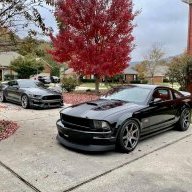
New to DSLR - First attempt at low light shots

Synyster06Gates

Senior Member
Joined
May 13, 2013
Posts
916
Reaction score
0
Location
Leander, TX
I'll start by saying I'm VERY new to the DSLR world. As in - I got my first DSLR on Friday. I'm attempting to learn how to use manual mode for everything so I can learn exactly how every setting works. That being said, I tried to do some low light shots this morning behind my work. It was about 7:30 AM and cloudy. They weren't very good. Maybe someone here can help me with my low light settings.

Camera - Canon T3i in RAW format
Lens - 18-55mm f3.5-5.6 IS kit lens

Settings - @55mm, f5.6, ISO 400-800 depending on angle, shutter speed 1/50-1/60

I would love some pointers. I was trying to get it close to correct exposure without dropping the shutter speed too low and the ISO so high I get noise. All of them ended up at about -1 exposure so I did some slight corrections in lightroom. Other than that, they're basically straight off the camera.

I was probably shaking. 32 degrees is cold for us Texans!

The top shots are from Saturday, pretty much my first attempt at all with a DSLR.

http://www.flickr.com/photos/112964838@N06/
Any opinions, advice, or constructive criticism is appreciated! Uploaded to flickr so they didn't get compressed by photobucket.
 
Last edited:

BlackCDCStang

Member
Joined
May 14, 2013
Posts
263
Reaction score
0
Location
OKC
The easiest way to shoot in low light is to have a FAST lens (f1.8 or lower if you can) There are a few fast lenses out that are very inexpensive such as the Canon f1.8 50mm which is around $80 or the Canon f1.8 85mm USM that is about $300. If this is not possible then…
1. Crank ISO as high as needed (Then use “Noise Ninja” or even “Neat Image” to correct the noise in post)
2. Shoot RAW just as you are now
3. Use aperture-priority with the lowest f-stop on the fastest lens you have (So f3.5 in your case)
4. If that is still an issue and your shutter speed is too low to hand-hold, then set exposure compensation down a stop which will increase your speed a little and then you can push the exposure back up in post
That extra stop or two can seriously make the difference in low light / no flash photography.
 
Last edited:

Bingo

Because street car
Joined
Apr 5, 2007
Posts
7,157
Reaction score
210
Location
Phila, PA
A tripod definitely helps, along with the aforementioned fast lens.
 

javdog07c/s

Member
Joined
Feb 21, 2011
Posts
287
Reaction score
0
Use Adobe Light Room, my buddy uses it on my pictures and they look awesome
Here is a sample of Light Room

Original taken with my Samsung Galaxy S3 on HDR setting


Same picture with Light Room


mfergel

Senior Member
Joined
Jul 14, 2011
Posts
2,354
Reaction score
4
Location
Richmond, VA
Holy moly. I'll have to look into that program. I used to use one called Photogenetics but didn't do anywhere near as well as that.
 

Synyster06Gates

Senior Member
Joined
May 13, 2013
Posts
916
Reaction score
0
Location
Leander, TX
The easiest way to shoot in low light is to have a FAST lens (f1.8 or lower if you can) There are a few fast lenses out that are very inexpensive such as the Canon f1.8 50mm which is around $80 or the Canon f1.8 85mm USM that is about $300. If this is not possible then…
1. Crank ISO as high as it will go (Then use “Noise Ninja” or even “Neat Image” to correct the noise in post)
2. Shoot RAW just as you are now
3. Use aperture-priority with the lowest f-stop on the fastest lens you have (So f3.5 in your case)

4. If that is still an issue and your shutter speed is too low to hand-hold, then set exposure compensation down a stop which will increase your speed a little and then you can push the exposure back up in post
That extra stop or two can seriously make the difference in low light / no flash photography.

Awesome, I'll probably look for a different lens here after I get a little more familiar with how everything works.

A tripod definitely helps, along with the aforementioned fast lens.

I've got a decent tripod at home, I just decided to snap some shots here right before work :)

Use Adobe Light Room, my buddy uses it on my pictures and they look awesome
Here is a sample of Light Room

Original taken with my Samsung Galaxy S3 on HDR setting


Same picture with Light Room

Looks good for a cell phone pic! I had an S3 too.

I use Lightroom, Photoshop CS6 (with full Topaz plug ins), Photomatix, and DynamicPhoto HDR for my photo editing programs.

Also, I just edited a few and changed the temperature to a FARRRR warmer amount to bring out some color. Doesn't look as bad as before.

Holy moly. I'll have to look into that program. I used to use one called Photogenetics but didn't do anywhere near as well as that.


Lightroom is great! Looks like he just upped the vividness and the saturation
 
Last edited:

BlackCDCStang

Member
Joined
May 14, 2013
Posts
263
Reaction score
0
Location
OKC
A few high quality lenses and strong editing skills will get you far! Its an addicting hobby for sure so have fun!
 

BlackCDCStang

Member
Joined
May 14, 2013
Posts
263
Reaction score
0
Location
OKC
Just to let you know its not so much the program that automatically edits this way its the skill of the editor. Although this particular photo could have been a quick 1 minute edit to achieve such great results that may not always be the case. There are times I have spent 30 minutes plus on a single photo and other times a mere 5 seconds. Just informing you since I thought the same thing back in the day and thought...if only I had this program or that lens etc when in the end it all I really needed was to improve my skills haha

Holy moly. I'll have to look into that program. I used to use one called Photogenetics but didn't do anywhere near as well as that.
 
Last edited:

Deez-67

Senior Member
Joined
Mar 12, 2009
Posts
6,288
Reaction score
56
Location
Edmond, Oklahoma
Yeah Lightroom is amazing!! I don't even know how to use it that well and I did this in just a few secs.

before

After
 

Synyster06Gates

Senior Member
Joined
May 13, 2013
Posts
916
Reaction score
0
Location
Leander, TX
Yeah Lightroom is amazing!! I don't even know how to use it that well and I did this in just a few secs.

before
After

Yep! I tried to leave these as plain as I could - essentially straight from the camera with exposure editing and noise removal on the ones that needed it.
 

06Mach1

Member
Joined
Feb 22, 2011
Posts
367
Reaction score
0
Good shots, the noise doesn't look too bad in these photos. But I'm guessing there was some shaking going on at 32 degrees. haha

Dump the kit lens for sure, the glass in those things aren't stellar. I think that alone will get you closer to the sharper photos you're looking for.
 

07TGGT

@user
Joined
Aug 3, 2009
Posts
9,408
Reaction score
12
Location
Mansfield, TX
Don't get all caught up in post-processing and forget about the most important thing...

The person taking the photos. No mediocre picture edited nicely can even come close to a excellent photo with a little correction.

Learn the essiential skills first, editing later.
 

ChrisGT

Nice Shirt Bilkins
Joined
Jan 25, 2011
Posts
686
Reaction score
2
Location
Huntsville, Alabama
Tripod bro!! Then you can set your iso at 100. I generally shoot at f8 to keep the entire car sharp and just lower the shutter speed as much as I need to with the tripod.

The pictures don't look bad at all though. Maybe a tad bit over-saturated, but not bad at all. Experiment with some different focal lengths! 55mm is a good "accurate to car" length though, so bravo.
 

Synyster06Gates

Senior Member
Joined
May 13, 2013
Posts
916
Reaction score
0
Location
Leander, TX
Tripod bro!! Then you can set your iso at 100. I generally shoot at f8 to keep the entire car sharp and just lower the shutter speed as much as I need to with the tripod.

The pictures don't look bad at all though. Maybe a tad bit over-saturated, but not bad at all. Experiment with some different focal lengths! 55mm is a good "accurate to car" length though, so bravo.

Thanks! I'll start using the tripod more often. The edited pictures were just uploaded on top of the originals. When I posted this morning it was just the files with exposure correction.
 

07TGGT

@user
Joined
Aug 3, 2009
Posts
9,408
Reaction score
12
Location
Mansfield, TX
Oh Stephen, I've had Flickr for years and never had an issue. Hell, I forget about Yahoo all together until I see the logo on Flickr.com.
 

Latest posts

Support us!

Support Us - Become A Supporting Member Today!

Click Here For Details

Back
Top